1. Link: https://www.linkedin.com/learning/
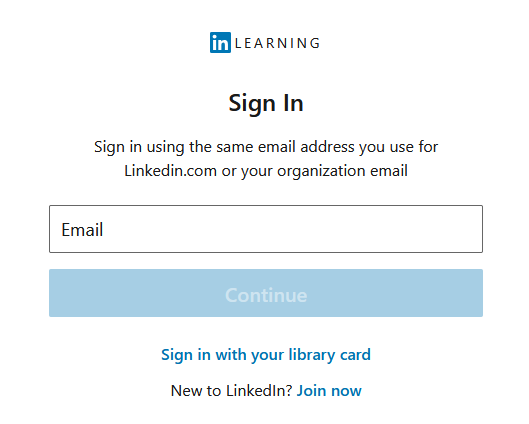
2. Enter CUNY Login email, click Continue
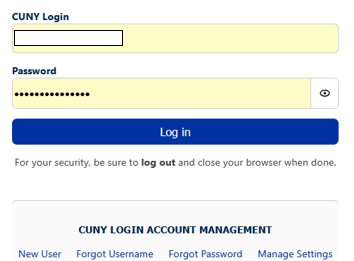
3. Enter CUNY Login and Password, click Login
4. Enter OTP (One Time Passcode).
If you have not set up MFA for CUNY applications, see following link for instructions, CUNY MFA Set up.
Download the Mobile App
Access all LinkedIn Learning content on the go with the LinkedIn Learning Mobile app for iOS or Android
- Download the LinkedIn Learning app from the iOS App Store or Google Play Store
- Open the app
- On the Login screen, enter CUNY Login username followed by @login.cuny.edu ( FirstName.LastName##@login.cuny.edu ).
- Click Sign in with Single Sign-On to be redirected to CUNY Login page.
- Enter your CUNY Login credentials, tab Login
- Enter the LinkedIn Learning app
LinkedIn Help Center or email the servicedesk@ccny.cuny.edu .
Frquently Asked Questions
What is LinkedIn Learning?
LinkedIn Learning is an online learning platform that provides thousands of on-demand courses to help people build professional, technical, and creative skills. It is owned by LinkedIn and is widely used by universities, companies, and individuals for professional development. Currently LinkedIn has over 22,000 courses across business, technology, and creative topics.
Who can access LinkedIn Learning?
LinkedIn Learning is currently accessible for faculty, staff and current students via CUNY Login.
What topics/course are available?
Business: These courses focus on workplace and professional skills.
- Leadership and Management
- Project Management
- Marketing
- Customer Service
- Human Resources
- Finance and Accounting
- Entrepreneurship / Small Business
- Career Development
Technology Topics: These courses focus on IT, programming, and digital technology.
- Artificial Intelligence (AI)
- Data Science and Data Analytics
- Cybersecurity
- Cloud Computing
- Software Development
- Mobile App Development
- Network and System Administration
- Database Management
- IT Help Desk
- Programming (Python, JavaScript, SQL, etc.)
What certifications and continuing education units/professional development units are offered?
There are many certifications and continuing education units available, with more being added regularly. For a full list, visit https://learning.linkedin.com/certifications-and-credentials be sure to check back often, as LinkedIn Learning continues to expand its offerings through new content and partnerships.
What should I do if I already have a LinkedIn Learning account?
If you have a private account with LinkedIn Learning, it does not impact your account with CUNY LinkedIn account. You have the option of linking them if you would like.
What are weekly goals on LinkedIn Learning?
Weekly goals on LinkedIn Learning are a feature that helps learners stay consistent by setting a target amount of time to spend learning each week. You can choose how many minutes per week you want to dedicate to courses—such as 30 minutes, 1 hour, or more. The platform then tracks your progress and shows how much time you’ve spent learning compared to your goal.
Is there a mobile app available?
Yes, in the app/play store on your device, simply find the LinkedIn Learning app for download. Once downloaded, you will login with your CUNY Login credentials, and your learning will automatically go with you wherever you go. Using the mobile option is a bit different and has the option to turn the courses to “audio-only” via a toggle within each course.
Are the courses free for students and employees?
Yes, free and unlimited access to thousands of LinkedIn Learning courses is available to active/current students, faculty, and staff.
How do I change the language of a course?
You can browse courses in different languages by changing your language settings in LinkedIn Learning. To do this, go to Me → Settings → Content Language and select your preferred language. You can also change the language using the language option in the footer of the LinkedIn Learning page.
How do I change the language on LinkedIn Learning?
You can change the language in LinkedIn Learning by clicking the globe icon in the top-right corner of the LinkedIn Learning homepage and selecting your preferred language from the drop-down menu.
LinkedIn Learning offers content in Simplified Chinese, English, French, German, Japanese, Portuguese, and Spanish. Please note that some courses and features may not be available in all languages.
How do I set or remove weekly goals for Learning?
- Sign in to LinkedIn Learning.
- Go to your Learning Dashboard or My Learning page.
- Locate the Weekly Goal section.
- Click Set goal or Edit goal.
- Choose the number of minutes per week you want to spend learning and save your selection.
To remove a weekly goal:
- Go to the Weekly Goal section on your Learning Dashboard.
- Select Edit goal.
- Choose the option to turn off or remove the goal (or set it to no goal, depending on the interface).
Weekly goals help track the time you spend watching courses and encourage consistent learning each week.


Last Updated: 09/09/2026 03:35